


The average life span of a lithium polymer battery is two to five years. A battery’s life depends on its use. The cycle life of a high-drain lithium-ion battery can be short. Its lifespan might end after just 50-100 charge cycles. The overall lifetime and lifespan of a lithium-ion battery is finite. This short life impacts the lithium battery lifespan. A key rule guides replacement.
The industry standard suggests replacing a battery when its maximum capacity drops below 80% of its original design. This signals the end of its useful life and poor cycle life.
How to Check Your Lithium Polymer Battery
Knowing your battery’s health is the first step toward deciding on a replacement. You can check its condition through software diagnostics or by looking for physical damage. Both methods provide critical clues about the remaining life of your battery.
Check Battery Health (<80% Capacity)
The most reliable digital indicator is the battery’s maximum capacity. Modern operating systems have built-in tools to report this figure. A capacity below 80% of the original design signals that the battery’s useful life is ending. This degradation significantly shortens its daily lifespan.
Here is how you can check the health of your lithium polymer battery on major platforms:
📱 For iOS (iPhone)
- Go to Settings.
- Scroll down and tap on Battery.
- Select Battery Health & Charging. You will see the “Maximum Capacity” percentage here. A healthy battery life is supported by a high capacity.
🤖 For Android Android’s reporting varies by manufacturer. Some, like Samsung, provide a direct health status.
- Open Settings > Battery and device care.
- Elija Diagnostics > Phone diagnostics.
- Check the Battery status for a “Life” reading.
For other Android devices, a third-party app is often the best choice.
Tip: Apps like AccuBattery can estimate your battery’s health. After a few charge cycles, the app’s “Health” tab will show an estimated capacity percentage compared to its design capacity.
💻 For Windows 10 & 11 Windows can generate a detailed battery report.
- Press the Windows key + X and select Terminal (Admin) o PowerShell (Admin).
- In the terminal window, type the command
powercfg /batteryreportand press Enter. - The report will be saved to your user folder. Open File Explorer and navigate to
C:Users[YourUsername]battery-report.html. - Open the file in a web browser. Look for “Design Capacity” and “Full Charge Capacity” to see how much the battery has degraded.
🖥️ For macOS Apple makes it easy to check your battery’s cycle count and condition.
- Hold down the Option key and click the Apple menu () in the top-left corner.
- Click System Information.
- In the new window, navigate to the Power section on the left sidebar.
- Under “Health Information,” you will find the Cycle Count y Condición (e.g., “Normal”). A high cycle count often corresponds with a reduced lifespan for the lithium-ion battery.
Look for Physical Warning Signs
Sometimes, a battery gives clear physical warnings that it is failing. These signs are serious and require immediate attention to prevent damage or injury. A failing lithium-ion battery can be a safety hazard.
The most common and dangerous sign is swelling. This happens when the electrolyte inside the battery decomposes and releases gas, often due to overcharging, excessive heato internal moisture. This gas buildup causes the battery’s casing to bulge.
Look for these unmistakable signs:
- A visible bulge or puffiness in the device’s case.
- The screen lifting away from the device’s body.
- Seams along the device’s chassis separating or creating new gaps.
- The device wobbling when placed on a flat surface.
- Any fluid leaking from the device, which may have a sharp, chemical smell.
🚨 SAFETY ALERT: A Swollen Battery is a Fire Hazard If you notice any swelling or physical damage, you must act immediately. Continuing to use or charge a swollen battery dramatically increases the risk of a fire or explosion. The internal pressure can rupture the casing, exposing flammable components.
What to Do:
- Power off the device immediately. Do not attempt to charge it again.
- If possible and safe, move the device to a non-flammable area, like on a concrete surface outdoors and away from anything combustible.
- Do not try to “fix” or puncture the battery.
- Take the device to a certified repair professional or an e-waste recycling facility that handles damaged batteries. Never throw it in the regular trash.
Key Performance Warning Signs
Beyond physical damage or a low capacity reading, your device’s daily behavior is a powerful indicator of battery health. A degrading battery struggles to perform its job, and you will notice the effects. These performance issues are often the first signs that a replacement is needed.
Drastically Shorter Usage Time
Does your phone die before the end of the day? A battery that once lasted from morning to night might now need a midday charge. This is the most common symptom of an aging battery. After 1 to 2 years of use, or about 300 to 500 charge cycles, a battery’s capacity naturally declines. This happens because its internal resistance increases, making it less efficient at delivering power. This chemical wear shortens its daily usage time and signals that the battery is nearing the end of its useful life.
Nota: If your device no longer holds enough charge for your typical day, its battery life is no longer meeting your needs. This is a practical reason for a replacement, regardless of the reported health percentage.
Unexpected Device Shutdowns
An even more frustrating sign is when your device suddenly turns off, even when the battery icon shows plenty of charge left. A degraded lithium-ion battery can struggle to provide a consistent power supply. When your device needs a quick burst of energy—like when you open a demanding app or use the camera flash—the old battery may fail to deliver, causing an instant shutdown.
This issue becomes very common when battery health drops below 80%. You might even see a message on your screen after it reboots, like this one from Apple:
“This iPhone has experienced an unexpected shutdown because the battery was unable to deliver the necessary peak power. Performance management has been applied to help prevent this from happening again.”
Seeing this message is a clear confirmation that your battery’s life is compromised. It means the device has already crashed at least once because of the battery’s inability to supply peak power.
Sluggish Performance and Throttling
Have you noticed that apps take longer to open? Does your device feel laggy or slow? This might not be your imagination. It could be “performance throttling,” a feature modern operating systems use to manage a failing lithium-ion battery.
To prevent unexpected shutdowns, your device’s operating system may intentionally slow down its processor (CPU). This is a power management strategy. A weak battery cannot provide enough voltage for the CPU to run at full speed during intensive tasks. Throttling lowers the power demand, which is better than having your phone shut down completely. This reduced performance is a direct trade-off to extend the device’s stability and overall lifespan.
You can identify throttling by looking for these signs:
- Applications operate at a slower pace than they used to.
- The system lags, with noticeable delays when you scroll or type.
- Tasks that were once quick now require more time to complete.
- Your device may feel surprisingly cool during heavy use because the CPU is not working as hard.
If you experience these issues, your battery is likely the root cause. Replacing it can restore your device’s original speed and performance.
Factors That Shorten Battery Lifespan
Your daily habits and environment play a big role in your battery’s health. Certain factors can significantly reduce the average life span of a lithium-ion battery. Understanding these factors helps you protect your device’s battery life.
Extreme Temperature Exposure
Temperature is one of the biggest enemies of a battery. High temperatures speed up the chemical reactions inside. This causes faster aging and permanent damage to the battery’s capacity. Leaving a device in a hot car, for example, can shorten its lifespan.
Cold temperatures are also a problem. Charging a lithium-ion battery below freezing (0°C or 32°F) causes an irreversible process called lithium plating. This damages the battery’s internal structure and reduces its life, even after just one time.
Optimal Temperature Ranges Following these guidelines can extend your battery’s lifespan.
Category Temperature Range (Celsius) Temperature Range (Fahrenheit) Cargando 0°C a 45°C 32°F to 113°F Usage -20°C a 60°C -4°F to 140°F Almacenamiento 15°C to 25°C 59°F to 77°F
Harmful Charging Habits
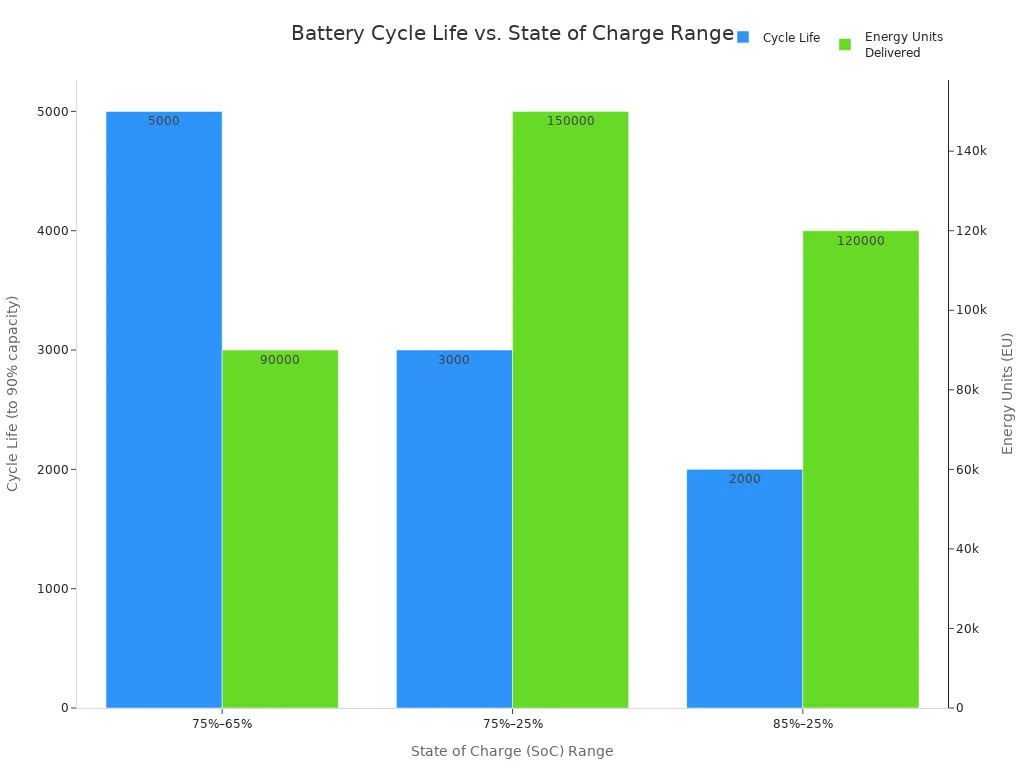
How you charge your device directly impacts its battery. Consistently charging to 100% or letting it drain to 0% puts stress on the battery cells. These habits shorten the battery’s cycle life.
A better practice is to keep the battery charge between 20% and 80%. This simple habit reduces voltage stress and helps the battery last longer. Many modern devices even have settings to automatically stop charging at 80%. Draining the battery completely causes “overdischarging,” which rapidly degrades its internal components and shortens its useful life.
Use of Uncertified or Fast Chargers
The charger you use matters. Uncertified or cheap chargers may not provide the correct voltage. Using a charger with a voltage that is too high can fry your device’s circuits.
Fast charging is convenient, but it also generates more heat. This extra heat speeds up battery degradation over time. While modern devices have systems to manage this, frequent fast charging can still reduce the battery’s overall lifetime and cycle life. Always try to use the official charger or a certified third-party brand to ensure safety and protect your battery’s long-term health.
Deciding when to replace your lithium polymer battery is simple. Use this final checklist to assess your device’s condition.
Your battery likely needs a replacement if:
- Its maximum capacity is below 80%.
- You see any physical swelling or damage.
- The device shuts down unexpectedly.
- It no longer lasts through a typical day.
If two or more of these points apply to your device, it’s time to replace your lithium polymer battery to regain performance and ensure safety.
PREGUNTAS FRECUENTES
What is a battery cycle count?
A cycle count is one full charge and discharge of a battery. For example, using 50% of your battery today and 50% tomorrow equals one cycle. High cycle counts, often over 500, mean the battery is older and has less capacity.
Can I replace the battery myself?
DIY replacement is possible but can be risky. Modern devices are sealed tightly. You need special tools and skills to avoid damaging the device or the new battery.
⚠️ Caution: For safety, we recommend visiting a certified repair professional. They have the right tools and expertise for the job.
How do I dispose of an old or swollen battery?
Never throw a lithium polymer battery in the regular trash. It is a fire hazard and contains harmful materials. You should take it to a proper disposal location.
- An e-waste recycling center
- A local electronics store with a take-back program
- A certified repair shop
Is it better to repair or replace my device?
Consider the cost and the device’s age. A battery replacement is much cheaper than a new device. If your device is otherwise in good condition, replacing the battery is a great way to extend its life and restore its performance.
 EN
EN ES
ES FR
FR DE
DE RU
RU ZH
ZH